


HTML vs Markdown for AI Reports: When Rich Output Beats Plain Text
For years, Markdown has been the default format for AI-generated answers. Ask an AI assistant for a plan, a spec, a report, or a technical explanation, and the output usually comes back as headings, bullet points, tables, and code blocks.
That default is changing.
A recent post by Thariq Shihipar, shared on X as "HTML is the new Markdown", argued that AI agents should often generate HTML instead of Markdown. The companion examples, collected in The Unreasonable Effectiveness of HTML, show why: many useful agent outputs are not just documents. They are review surfaces, reports, diagrams, dashboards, prototypes, and small interfaces.
Simon Willison summarized the same shift well in Using Claude Code: The Unreasonable Effectiveness of HTML: Markdown was attractive in earlier AI workflows because it was compact and token-efficient, but HTML lets agents include diagrams, navigation, widgets, and more readable visual structure.
For data work, this distinction matters. A database answer is rarely just text. It often needs a chart, a table, a timeline, a summary, a caveat, a query, and a way for another person to scan the result quickly.
That is why PromptQuery supports AI-generated reports as HTML artifacts.
The Short Version
Markdown is excellent when the output should be easy to write, edit, diff, and store.
HTML is better when the output should be easy to read, scan, present, navigate, and share visually.
The practical rule is simple:
- Use Markdown for notes, drafts, READMEs, specs, prompts, and source-like documents.
- Use HTML for reports, dashboards, visual comparisons, diagrams, presentations, and interactive artifacts.
This is not really a fight between two formats. It is a question of whether the AI should produce a durable source document or a polished review surface.
Why Markdown Became the AI Default
Markdown became popular in AI tools for good reasons.
It is:
- Readable as plain text - You can open it anywhere and still understand it.
- Easy to edit - Humans can quickly change headings, bullets, links, and code blocks.
- Version-control friendly - Markdown diffs are clean and easy to review.
- Compact - It usually uses fewer tokens than HTML.
- Portable - It works in GitHub, docs sites, note apps, chat tools, and static site generators.
For engineering teams, Markdown remains a great format for long-term documentation. A product spec, implementation plan, README, changelog, or runbook should usually start as Markdown because it is easy to maintain.
But Markdown has a ceiling.
Once an AI response grows beyond a few screens, it becomes a wall of text. Tables get hard to scan. Diagrams become ASCII art. Comparisons become long sequential sections. Reports lose visual hierarchy. Readers have to hold too much context in their head.
That is where HTML starts to win.
What HTML Gives AI Agents
HTML gives AI-generated output a richer canvas.
With HTML, an agent can create:
- Visual hierarchy with spacing, color, cards, sections, and callouts.
- Charts and diagrams with SVG, Canvas, or embedded visual structures.
- Navigation with a table of contents, tabs, anchors, and jump links.
- Responsive layouts that work better on different screen sizes.
- Interactive elements such as filters, toggles, expanders, and copy buttons.
- Presentation-ready reports that can be opened directly in a browser.
- Shareable artifacts that do not require a Markdown renderer.
This is especially useful when the AI output needs to communicate shape, priority, sequence, comparison, or status.
Markdown can describe those things. HTML can show them.
HTML vs Markdown: Practical Comparison
Here is a practical way to decide between the two formats:
- README or internal docs - Markdown is usually the best fit. HTML is possible, but harder to maintain.
- Blog drafts - Markdown is better as the source format. HTML is useful after rendering.
- Technical specs - Markdown is best for the source document. HTML helps when you need executive summaries, diagrams, or visual review pages.
- Code review explanations - Markdown works well for notes. HTML is better for annotated diffs, visual maps, and expandable details.
- Data reports - Markdown is fine for raw summaries. HTML is better for charts, tables, callouts, and layout.
- Dashboard-style output - Markdown is limited. HTML is the stronger fit.
- Interactive artifacts - Markdown is not suitable. HTML is the right choice.
- Long-term source control - Markdown is easier to diff. HTML is more verbose and noisier to review.
- Sharing with non-technical teammates - Rendered Markdown can work, but HTML often feels more polished because browsers open it directly.
The key difference is not whether one format is more modern. The key difference is the job the output is doing.
If the output is meant to be edited later, Markdown is usually better.
If the output is meant to be read, reviewed, presented, or shared, HTML can be better.
Why This Matters for Data Analysis
Data analysis is one of the clearest cases where HTML can outperform Markdown.
Imagine asking an AI agent:
Analyze monthly revenue, identify the biggest changes, and create a report for the team.
A Markdown answer can provide:
- A written summary
- A basic table
- The SQL query
- A few bullet-point insights
That is useful, but it is not always enough.
A strong analytical report often needs:
- A headline metric
- A chart or visual trend
- A table of supporting rows
- Callouts for anomalies
- A section explaining methodology
- The SQL that produced the result
- Risks, assumptions, and next steps
- A shareable link for stakeholders
HTML handles that naturally. The report can have a visual structure that helps people understand the result before they read every line.
For marketing, sales, finance, product, and operations teams, that difference is important. Stakeholders rarely want a raw query result. They want an answer they can trust and share.
PromptQuery and HTML Report Generation
PromptQuery is built around the idea that AI should help you move from database question to useful artifact.
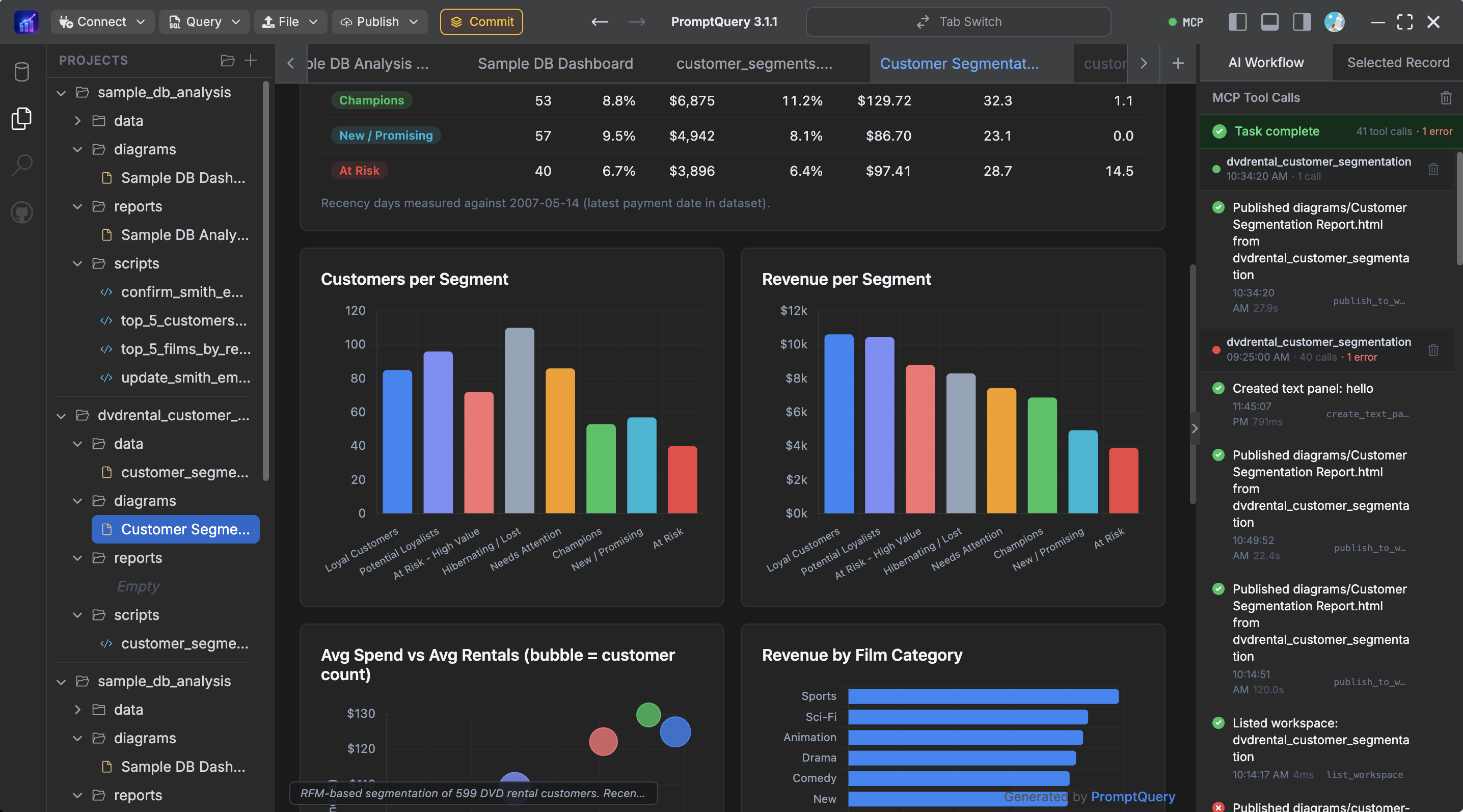
The screenshot above shows an example of a model-generated report created from database context in PromptQuery. Instead of returning only a plain-text answer, the model can produce a structured HTML report that is easier to review and share.
Instead of stopping at generated SQL, PromptQuery can help AI agents work through a broader workflow:
- Connect to a real database.
- Inspect schema context safely.
- Generate SQL from a natural-language question.
- Run approved analysis.
- Summarize results.
- Create a report from the findings.
- Publish or share selected outputs when needed.
HTML report generation fits naturally into this workflow.
When a report is generated as HTML, it can include the structure that data work needs:
- Executive summary cards
- Charts and trend sections
- Query result tables
- Methodology notes
- SQL snippets
- Warnings and assumptions
- Shareable report pages
For example, you could ask an AI agent connected through PromptQuery:
Compare this month's revenue with last month, break it down by plan, explain the biggest changes, and create a shareable HTML report.
PromptQuery gives the agent database context through its MCP workflow, while keeping database access controlled. The result can be more than a chat response: it can become a readable report that a teammate can open, review, and discuss.
Markdown Is Still the Right Source Format
The rise of HTML output does not mean Markdown is obsolete.
Markdown is still the better format for many internal and source-controlled assets:
- Product requirements
- Engineering plans
- Blog drafts
- API notes
- README files
- Changelogs
- Prompt libraries
- Lightweight analysis notes
Markdown works because it is simple. That simplicity is a feature when humans need to edit the file directly.
HTML becomes more useful when the output is closer to an application screen than a document.
The Best Workflow: Markdown for Source, HTML for Surface
The strongest workflow is not HTML instead of Markdown everywhere.
It is:
- Use Markdown when you need a clean source document.
- Use HTML when you need a rich review or reporting surface.
- Keep the underlying data, SQL, and assumptions visible.
- Make the final output easy to share with the people who need it.
In data analysis, this often means keeping the query and methodology available, while presenting the findings as a well-structured HTML report.
That gives teams both trust and readability:
- Analysts can inspect the SQL.
- Engineers can review the logic.
- Managers can read the summary.
- Operators can act on the next steps.
When to Ask an AI Agent for HTML
Ask for HTML when you want the output to be consumed visually.
Good prompts include:
Create an HTML report with an executive summary, key metrics, a chart section, anomalies, methodology, and next steps.
Generate a single-file HTML artifact that compares these three options side by side with pros, cons, risks, and recommendation cards.
Turn this database analysis into a shareable HTML report with the SQL query, assumptions, charts, and stakeholder-friendly summary.
Build an HTML review page with navigation, severity labels, expandable details, and a final action checklist.
Ask for Markdown when you want something you will edit, commit, or reuse as source material.
Good prompts include:
Write a Markdown implementation plan that I can commit to the repo.
Draft a Markdown blog post with headings, examples, and a conclusion.
Create a Markdown checklist for reviewing data quality before importing CSV files.
Conclusion
Markdown is still one of the best formats for writing. It is simple, durable, and easy to maintain.
HTML is often the better format for communicating. It gives AI agents a browser-native canvas for reports, diagrams, comparisons, and interactive artifacts.
For database work, this matters because the final deliverable is rarely just a query. The final deliverable is understanding.
PromptQuery brings that workflow into AI-powered data analysis: connect your database, ask questions in natural language, generate SQL, analyze results, and turn the findings into shareable HTML reports.